What this thing does, in plain words
A tour of the terminal for the people who use it: what each screen is for, what the numbers actually say, what is yours to keep, and what the app deliberately will not do. No setup, no configuration, no code — that is the complete manual. Start here, go there when you want the exact definition of a column.
Nothing here is investment advice. Everything below is a description of what the software computes and shows.
01What it is
Milst Screener watches the perpetual futures markets on Hyperliquid's xyz dex —
synthetic perps that track US and foreign stocks, indices, FX, commodities and baskets — plus a
second, separate universe of the main-dex crypto perps. It is a read-only monitor: it shows
you what the tape is doing, keeps a record of the conditions it flagged, and tells you when
something you asked about happens. It cannot place an order, and it never holds a key that could.
The design has one central idea, and knowing it explains most of what you will see: the heavy work happens once, on the server. A small process polls Hyperliquid, archives candles, samples open interest, computes every feature and caches the result. Your browser reads a single finished snapshot. Nobody's browser talks to the exchange, so the page opens in seconds instead of minutes, and everyone is looking at the same numbers at the same time.
The snapshot
The market table is rebuilt about every 15 seconds and
served whole. The updated field in the status line is the server's last
successful poll — not your last refresh.
The live stream
While the status line reads push live,
the server tells your browser the moment something changed and the browser fetches it. The
refresh selector is the fallback for when that stream drops.
The archive
Open interest, funding history, candles, the signal ledger, your notes and messages live on a disk that survives restarts. A redeploy serves a warm table within a poll or two.
02Your first ten minutes
- Sign in. You get in through a single-use invite link from the operator, pick a handle and a password, and that account is yours across devices. Forgot it? The reset code goes to your linked Telegram.
- Land on Markets and pick a scope. The Stocks | Crypto pills at the top switch between the two universes. They never mix. Whichever you pick is remembered for next time.
- Set the analysis window. The
1h · 4h · 1d · 7d · 30dselector re-anchors every window-relative column at once — vs S&P, vs tape, ΔOI, Squeeze, Carry, Avg Range, RVOL all answer "over this window". Most confusion about a number is a window you forgot you set. - 1Stocks | Crypto scope
- 2window
- 3click a header to sort
- 4Filters
- 5Layouts
- 6Columns
- 7↓ CSV
- 8type to filter tickers
- 9status line
- 10? help
- 11🔔 bell
- Hover anything that puzzles you. Every number in the app explains itself on hover: exact inputs, the window it was measured over, the sample size behind it. Press ? for the "how to read this tab" card, which links into the manual.
- 1the two guides
- 2how to read this tab
- Open a name. Click a row (or press Enter on a highlighted one) and the ticker drawer slides in: candles, positioning, event risk, co-movers, news, the signal record, your notes. That name becomes the focused ticker — every other tab now opens on it.
- 1the drawer
- Star a few names. ★ pins a market to your watchlist, floats it to the top of the table, and follows your account onto your phone.
- Arrange the table once, then save it. The ⚙ column menu shows, hides and reorders columns; Layouts saves that arrangement (columns, sort, window, filters, ★-only) under a name you choose. Phones start from a mobile preset and can keep their own layout.
- Ask a question instead of hunting. Press ~ (or the ▸_ Ask button) and
type
top funding 5,nvda,most crowded shorts,whats above the 200dma. - Set one alert. The 🔔 bell in the status line holds your rules: ticker, metric, above/below, threshold. It is evaluated on the server against the same snapshot the board renders, so it fires with no tab open. Link Telegram there and it reaches your phone.
- Write one note. In the drawer, above the charts. It is stamped with the price it was written at, so every later read says "wrote it at 113.90 · +4.0% since". That one field is the whole point.
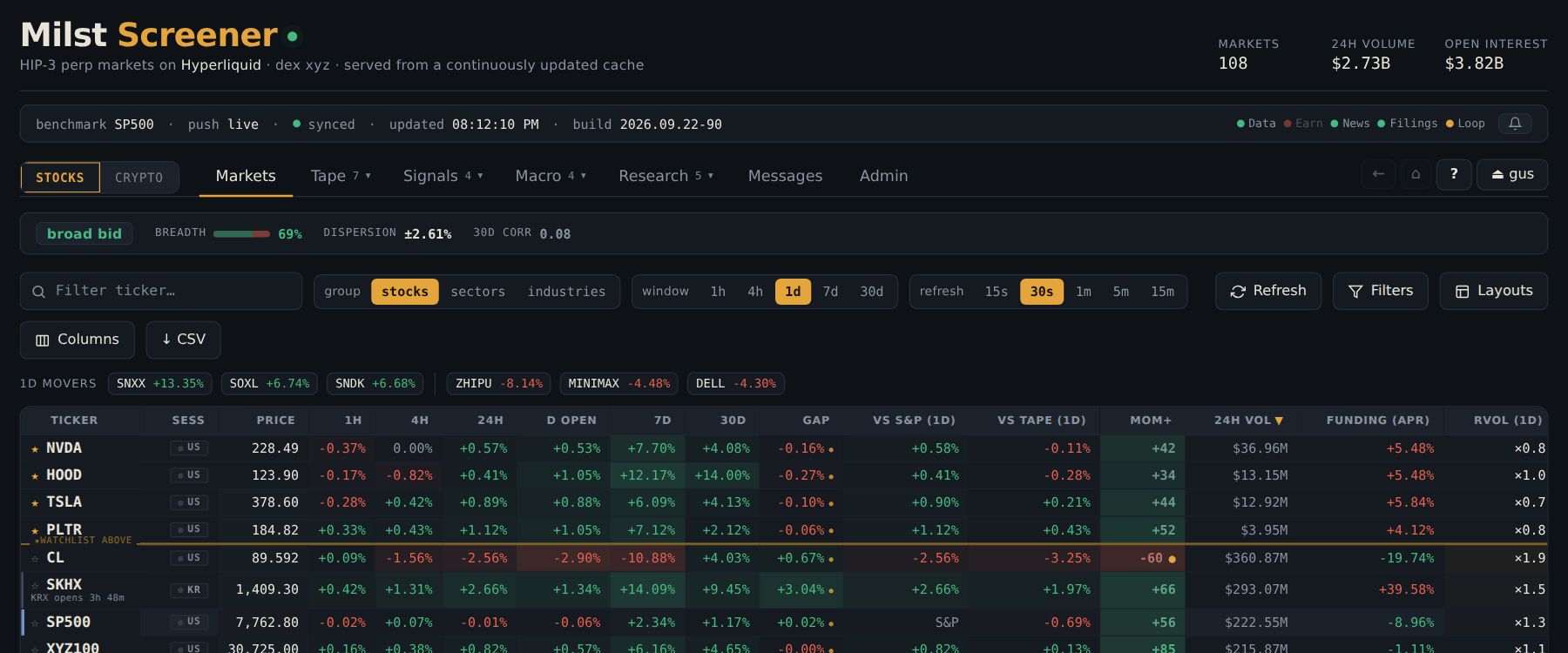 1234567891011
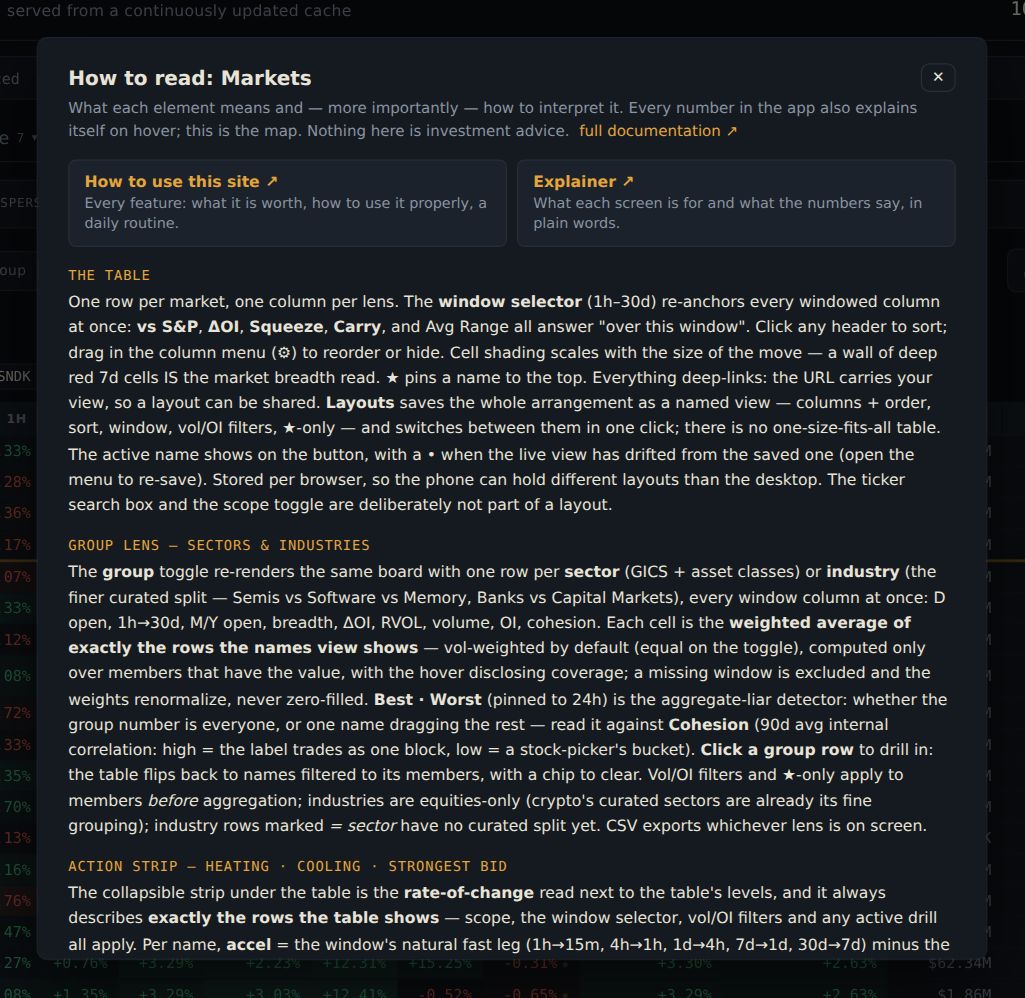 12
12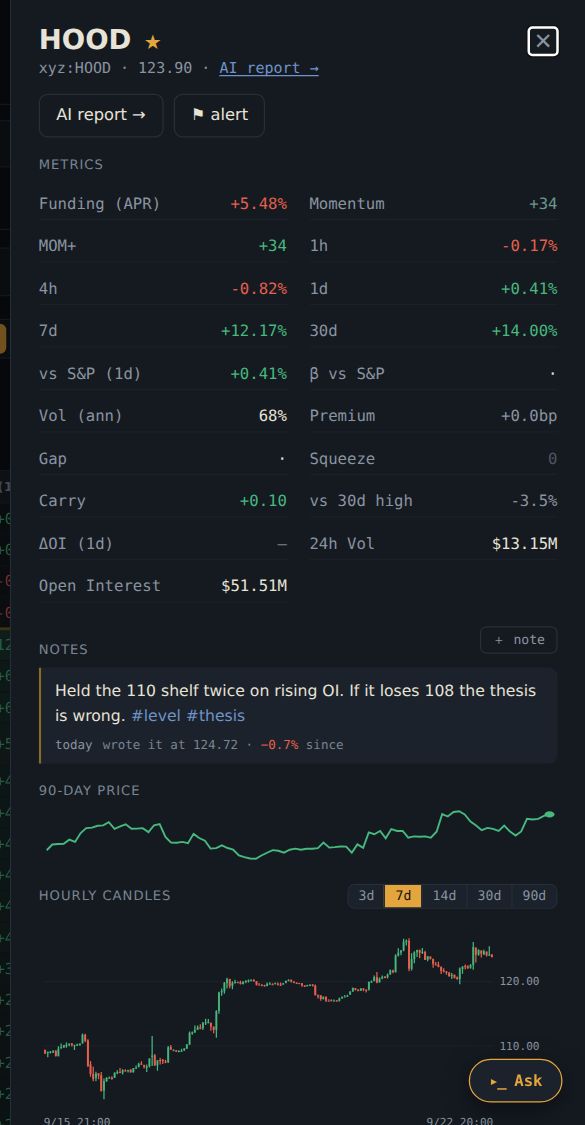 1
19:40 ET. You open Markets, window 1d, sort vs tape. HOOD is green on a red tape with unusual volume. You press Enter: the drawer says it reports Thursday, median reaction 7%. You write one line in Notes: "strong on a weak tape, print Thursday, no size into it." Stamped at 113.90.
You set one rule — HOOD price < 108 — and close the laptop. That was six minutes, and the site will now do the watching.
03Six ideas that explain every screen
1 · Two universes, one wall
Stocks and crypto are separate worlds with separate benchmarks (the S&P 500 perp; BTC), separate histories and separate visibility. Session concepts — gaps, overnight holds, cash sessions — do not exist on a 24/7 tape and simply vanish in crypto scope.
why a column disappeared2 · The window re-anchors everything
One control, many columns. A "squeeze of 70" is a 70 over the window you chose. The action strip, the sector cells and the CSV export all describe exactly the rows and window on screen.
why two people see different numbers3 · One number, one code path
A level, a score or a record is computed once on the server and restated everywhere. The board, the drawer, the alert and the Telegram message cannot disagree, because none of them recomputes. Your browser only re-times the live mark.
why the alert matches the card4 · A dash is a dash
Missing history, an unqualified baseline, a retired data series — all render as an explicit blank. Never a guess, never an interpolation, never a zero standing in for "we don't know".
why crypto shows dashes past MA205 · A signal is a condition, not a prediction
Every flagged condition is ranked by how unusual it is now plus what happened the last times it occurred — with the sample size, the median outcome and the hit rate stated on the card. Each one is ledgered at the mark it fired at and scored out of sample afterwards. The card is the part to read; the record is the part to trust.
how to weigh anything the engine says6 · Prose carries its price
A note or a message that names a ticker is stamped with the mark at the moment it was written. Editing rewrites the words and nothing else — the timestamp and the stamp stand, and the edit is disclosed. A call cannot quietly become a better call — and since calls are public, every member's record is scored by the same rules on the same board.
why notes beat a text file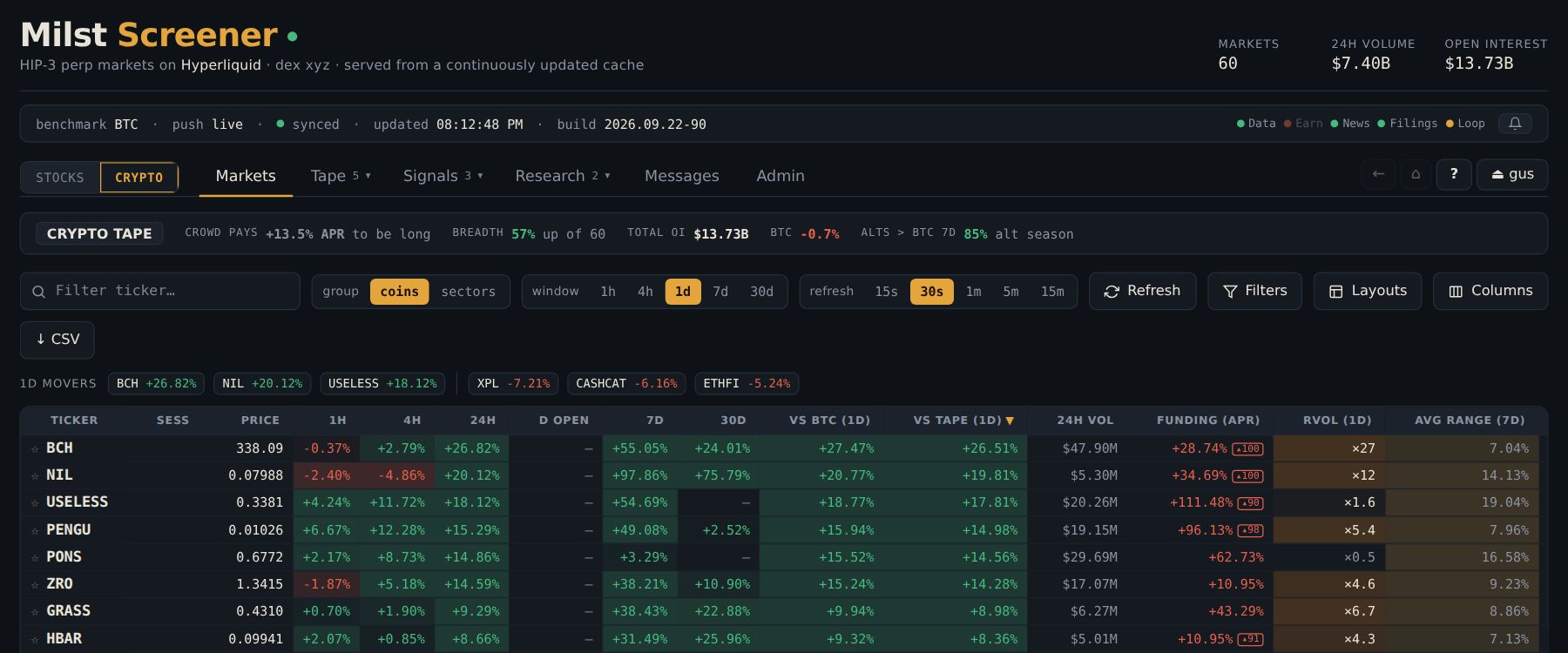 12
12- 1Crypto scope
- 2the regime strip
- 1What and when — the event, the reading, and the mark the claim is scored against.
- 2The evidence — read n first. 23 occurrences is a base rate; 3 is a story.
- 3The mechanical play — side, target, the level that voids it. Never moves after it fires.
- 4One thing to watch — the corroboration that would confirm or kill it.
04The screens, and when to open each
Every tab is one question asked of the same rows. Tabs marked operator-only by default ship closed to the group; if you cannot see one, it is not hidden from you by accident — the operator has not opened it, and its data routes refuse too.
The tape
Markets
The home board: one row per market, ~40 columns, sortable, filterable, exportable. Everything else in the app is a different cut of these rows.
start here, alwaysTicker drawer
One name, every surface at once: candles, where the 30d return happened, positioning, event risk, co-movers and hedges, fundamentals, news, your notes, the signal record.
"tell me about this name"Trend
An EMA 13/21 ladder on four timeframes per name, scored 0–4 by how many agree, ranked into long and short boards. RETEST marks the pullback into the ribbon.
"what is actually trending, and where is the entry"Charts
Up to eight names side by side, or one name across timeframes in a multi-timeframe wall, with linked crosshair and zoom.
comparing shapes, not numbersTreemap
The universe as tiles: area is volume or open interest, colour is the move over your window.
the ten-second read of the daySectors
Where capital is flowing: a rotation flow map, leaders, cohesion (does the label trade as one block?) and a sector × sector correlation matrix.
"which theme is being bought"Correlation
What moves with what: a cluster-ordered matrix, pair detail with hedge β and a spread z-score, co-movers and natural hedges, rebased overlays and synthetic ratio candles.
before you double a bet you already haveFunding
Carry across the whole book over calendar time. Red = longs pay, green = longs receive; a bucket with too little data is hatched, never drawn as flat. Each row ends with its window mean beside its current funding.
"is the crowd paying more or less than it was"Sessions
When the returns actually happen: overnight vs cash vs weekend holds as equity curves, net of the funding drag, plus hour-of-day and day-of-week clocks.
"when should I be holding this"Drawdownoperator
Return since a date you pick against the worst drawdown taken to get it, one dot per market — up and to the right is more return for less pain — with the benchmarks drawn as lines.
"who earned it, and who just survived it"Signals and setups
Signals
Unusual conditions, ranked and audited. Every card states the evidence in one fixed grammar — sample size, median outcome, hit rate, expectancy, horizon — plus the mechanical side, void and target. Search any ticker for its whole claim-by-claim history.
"what is unusual right now, and has it ever mattered"Actionableoperator
Only the names sitting at a trigger right now, with the entry, invalidation and target you would actually use — and reward:risk stated net of expected funding.
the morning listFocusoperator
Six equities, stamped once at the cash open and then frozen for the day. A compressed morning scan that deliberately never reshuffles because a number ticked.
first fifteen minutes of the US dayBacktestoperator
Cross-sectional long/short tests on the daily returns already in your browser, with an out-of-sample split, costs and funding — plus the running duel between the two momentum scores. Name one ticker in the target box and it becomes a timing test on that name; the D1 retest study checks whether the Trend board's RETEST beats simply being in the trend.
"does this ranking rule hold up"EMA Touchoperator
Every name's 50 and 200 EMA on the 4H and 1D candles: who is touching one now, who is within reach, and how each touch resolved at the candle's close — Support held, Broke down, Reclaimed — with the close that would invalidate it written on the card.
"is anything pulling back into a line I care about"Calls
Every member's price calls, public and scored the same way: a leaderboard ranked on what the record can prove (not on a lucky streak), each caller's profile, every call drawn on its candles with its thesis, and a copy score that asks whether following them would have paid after delay, fees and funding. Follow a caller and their next call reaches your phone.
"who on this desk is worth listening to"Context and calendar
Calendar
Earnings for the next two weeks with the session (before the open, after the close), prints from the last two days with beat/miss and the reaction move, each name's own earnings reaction study, and the macro prints — FOMC, CPI, payrolls, PPI, retail sales, GDP, PCE. The Setups strip on top gives each name reporting within five sessions a pre-earnings card: how it usually reacts, who is positioned into the print, the run-up, and whether volatility looks cheap or already bid.
before you size anything into a printNews
72 hours of headlines tied to names in the universe, merged with the macro tape and SEC filings, badged where a name has earnings or an open signal.
"why is this moving"Housing · Liquidityoperator
The macro backdrop: mortgage rates, starts, supply and non-QM spreads; and Fed net liquidity with the TGA and reverse-repo drains.
the weather behind the tapeCongress · Insidersoperator
STOCK Act disclosures (amounts are the disclosed band, never a point figure) and SEC Form 4 transactions (exact shares, exact price, exact date), both sorted by when the market learned.
who was buying their own nameYour own work
AI Report
Everything the server holds on one name compiled into a written read: the picture, what the data says, scenarios with computed reward:risk, a mandatory action block, what would change the read. Every number it cites is a number another tab shows, and every directional read is ledgered and graded like any other claim.
when you want it in sentencesNotesoperator
Every note you have
written, newest first, searchable and filterable by the #tags in the bodies. Each one
carries the mark it was written at and the move since. A name rotated out of the universe keeps its
note.
Messages
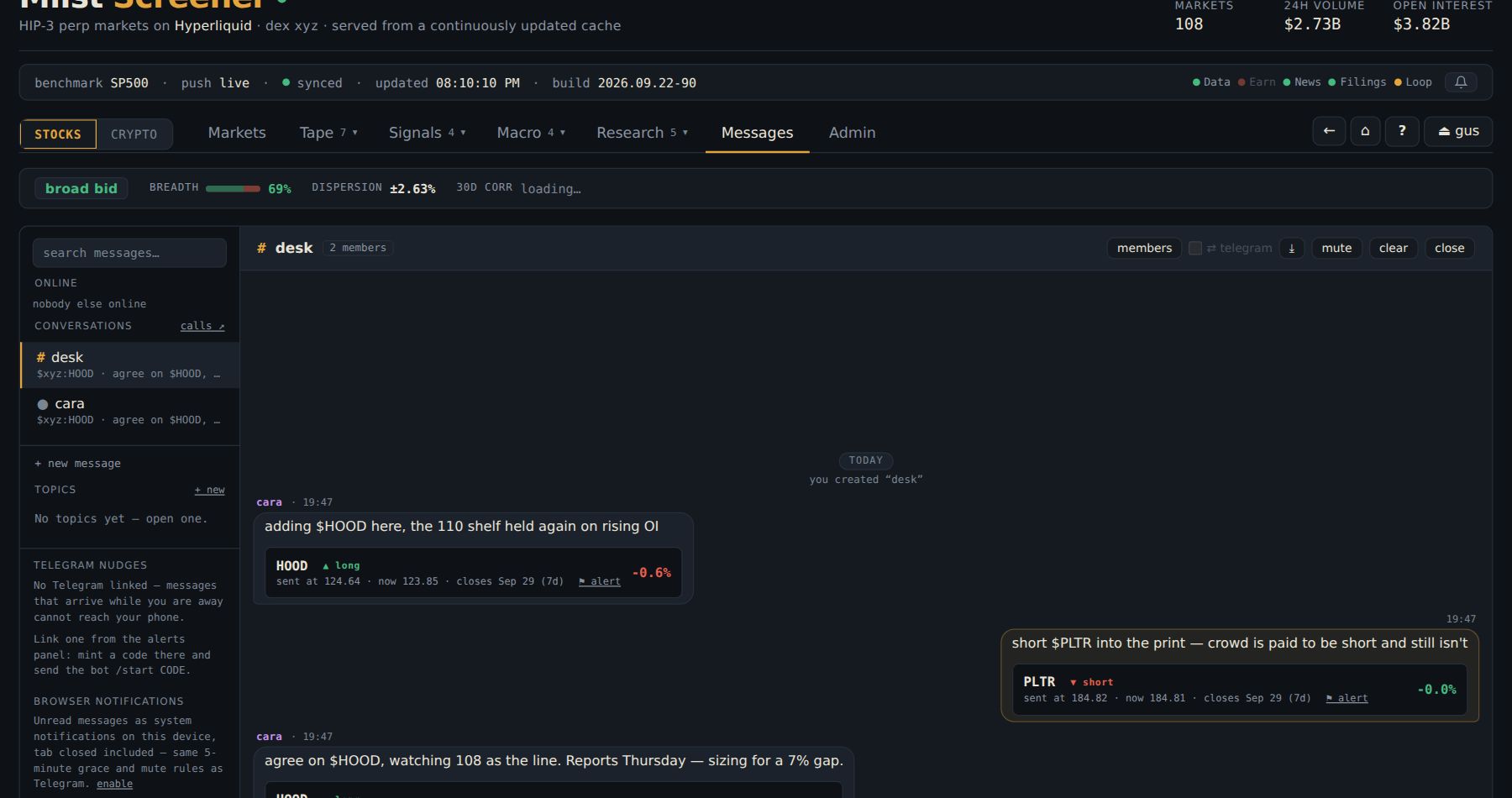
Conversations between account holders where a
$TICKER is stamped with the price at the moment you sent it — so a call reads "sent at
113.90 · +4.0%" forever. A message that reads as a call asks once before it goes on the public
record; calls ↗ opens the Calls tab. Slash commands post live tables into the thread, the ⤴
shares any cell, row, board or chart into it, and you can mirror a conversation to Telegram both
ways.
Fundsoperator
Tracked 13F filers with their books and quarter-over-quarter deltas. Positioning history filed up to 45 days late — never the current book, and labelled as such.
slow money, read slowly05Reading the numbers you will meet most
Exact formulas live in the manual and on every hover. These are the plain-English readings.
| What you see | What it is telling you |
|---|---|
| Funding (APR) | Positive/red = longs pay to hold the position — the crowd is long and carry is a cost. Negative/green = longs get paid. A ▴/▾ flag means today's rate sits at the top or bottom decile of this market's own last month. |
| Prem | How far the perp has dislocated from its oracle price, in basis points. When the underlying cash market is closed, a persistent premium is the off-hours price discovery. |
| ΔOI + its tag | Whether money is arriving or leaving, read against price:
longs+ new money confirming · squeeze shorts covering, not fresh demand ·
shorts+ new money pressing lower · unwind longs deleveraging. Open interest
is symmetric, so which side owns it is always an inference — and the hover says so. |
| the four tags, drawn | |
| RVOL | Volume against the same clock hours over the past month. 1.0× is normal for this time of day; 2×+ is genuinely elevated. The session shape cannot masquerade as a signal. |
| Momentum · MOM+ | A self-normalizing −100…+100 score, comparable across a sleepy FX pair and a violent synthetic. MOM+ is the challenger being scored head-to-head against it every day, in public, on the Backtest tab. |
| Squeeze | How loaded the short-squeeze spring is: shorts paying, open interest building, price pressing the 30-day high. Zero whenever funding is positive — no crowded shorts, no squeeze. |
| Carry | Funding per unit of volatility: how much you are paid for taking the unpopular side, adjusted for how wild the ride is. |
| vs S&P · vs tape | Excess return over the benchmark, and over the universe median. On a day when everything is red, "vs tape" is the honest relative-strength read. |
| OI / Vol | Positioning divided by turnover. ≥2 means crowded positioning that cannot exit quickly; under 0.5 is fresh churn. |
| DownCap · Hit% | How much of the tape's drop this name eats on red bars, and how consistently. A flattering DownCap with a low Hit% means a couple of lucky bars carried it. |
| vs VWAP | Where price sits against the month's volume-weighted average — roughly, whether recent buyers are in profit or trapped. |
| Beta | How much of the benchmark's move this name typically takes: above 1 amplifies, below 1 dampens, negative moves inverse. |
Badges in the ticker cell
| Mark | Meaning |
|---|---|
| ★ / ☆ | Watchlist. Follows your account across devices. |
| E | Earnings: solid = reports today, hollow = tomorrow. After the print it becomes a scoreboard — beat/miss and the day's move. |
| ◢ | You have a note on this name. Bright within a week, dimmer to a month, a hollow outline after; a count past one. Hover for the first line and the move since. |
| ⬡ | Your linked wallet holds a position here, in the side's colour. |
| ◆ Casc | Crypto: a liquidation cascade in the last 24 hours. Red = longs were liquidated, green = shorts. |
| Amber rail | A foreign-listed name whose home exchange is open right now; the microline counts down to the next open or close. |
06What is yours, and where it lives
| Thing | What it does | Where it lives |
|---|---|---|
| ★ Watchlist | Pins names to the top of the table and to the ★-only filter. | Your account — the same on phone and desktop. |
| Saved layouts | Named table views: columns and order, sort, window, volume/OI filters, ★-only. A • means the live view has drifted from the saved one. | Your account. Which layout is active stays per browser on purpose, so a phone can run its own. |
| Notes | Your prose on a name, price-stamped, tagged, searchable. | The server, on disk — not this browser's storage. |
| Alerts and rules | Up to 60 personal metric rules, evaluated server-side with no tab open, plus which alert classes reach you. | The server; delivery to your browser and your linked Telegram. |
| Linked wallet | A Hyperliquid public address that overlays your open positions onto the board and the drawer. | Your account. Read-only: the app reads public state and can never sign. |
| Messages | Conversations and their price stamps. | The server. On this deployment the operator can read every conversation, and every such read is logged. |
| Calls | Your calls, their thesis, updates, post-mortems and results — your record on the leaderboard. | The server, and public to every member. A call from a group or topic shows with its message; a call from a DM shows the call and its thesis, never the words or who it was said to. Deleting the message never removes the call. |
| Follows | The callers whose next public call reaches your phone, and the paper portfolio that copies them. | Your account. |
| Your usage | Which tabs you open and for how long — never what you type, search or filter. | The server, per member for 30 days, then folded into site totals. The Your usage card in the Messages rail shows you exactly what the operator sees, and can pause it. |
| Per-browser only | Tab order, the active layout, theme and density, the funding unit, the analysis window and refresh cadence, terminal history, chat drafts. | This browser. Nothing here syncs, by design. |
#sectors
opens a tab, #t=NVDA opens that name's drawer. Paste one into an open tab and it
navigates.Two notes, two stamps. Each is read against today's mark, so the second one already tells you it was the better call. Editing either would change the words only — the stamp stays.
 1
1- 1calls ↗ — opens the Calls tab
$TICKER is stamped with the price it was sent at.07Asking instead of hunting
Press ~ or click ▸_ Ask. The console runs over the rows already in your browser, so answers are instant. Tab completes verbs, fields and tickers; ↑ ↓ walk your history; every result names the rows it ran on.
| Type this | Get |
|---|---|
| nvda | The name's card — price, day move, funding, OI, squeeze, momentum, vs tape. |
| nvda funding | One column on one name. |
| top funding 5 | Any column ranked, plus gainers, losers, trending. |
| screen rvol>2 & squeeze>50 | A filter across the board, fields joined with &. |
| breadth · sectors | How healthy the tape is; which sectors are working. |
| earnings today · news nvda | The calendar and the 72-hour headline window. |
| vs nvda amd · corr nvda amd | Side-by-side compare; correlation and hedge β. |
| comp AAPL MSFT NVDA · ratio NVDA/BTC 4h | Rebased overlays; synthetic pair candles. |
| report nvda | Open or generate the written analyst read. |
| most crowded shorts · hows the tape | Plain English — common questions are translated into the grammar and the translation is echoed back so you can see what it ran. |
ask chip shows the group's remaining calls for the
day, and a 🔒 means generation is locked until an operator unlocks it. Local verbs never touch the
budget.The same verbs, in a conversation
In any Messages thread, type / and the verb — /top funding 5,
/nvda, /screen rvol>2, /earnings today — and the result
posts into the thread under your name, badged computed, so the group reads one table instead
of six people opening the panel. Two extras only exist here:
/alert NVDA > 200,/alert NVDA crosses down 180,/alert any rvol > 3— a threshold rule bound to that conversation: when it fires, the fire posts there./alert listand/alert off <id>manage them./share <ticker>, or the ⤴ that appears when you hover a cell — posts any cell, row or screen of the markets table as a data card, optionally quoted as a call.
08Being told, instead of watching
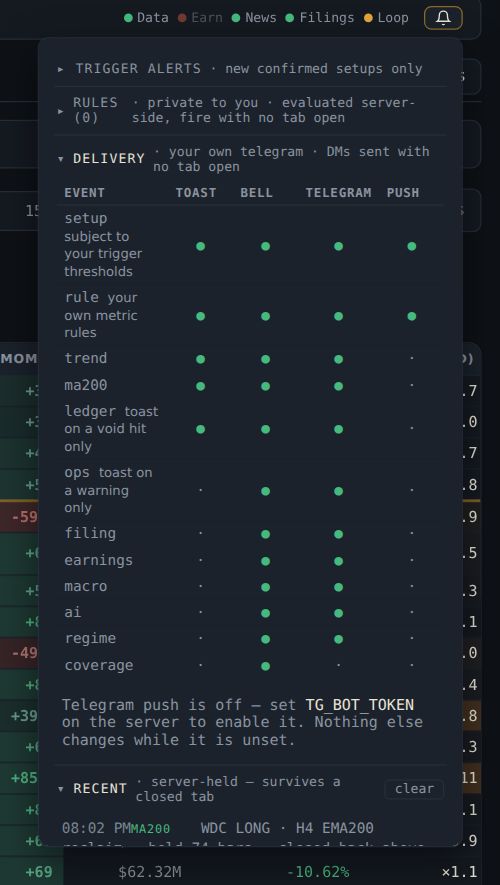
The 🔔 bell lives in the status line, so it is reachable from every tab. One event stream feeds every channel — the in-tab toast, the bell panel, Telegram, browser push — so a channel's settings can quiet your phone without ever editing the record of what fired.
 1
1- 1the bell panel
Your own rules
Ticker (or blank for any market) · metric · above or below · threshold. Price, the window returns, funding and its percentile, premium, volume, open interest, relative volume, ΔOI, liquidations. Evaluated on the server against the same snapshot the board renders, with an arm band and a cooldown so one crossing is one alert.
Classes you opt into
Setups and ledger outcomes are on by default. Trend changes, 200-day crosses, material SEC filings, earnings on names you have a claim open on, macro prints, a flipped AI stance, tape-wide crowding extremes and feed outages are each a switch, shown with how often they actually fire.
Telegram
Link once from the bell (a single-use code, ten minutes), then pick classes and quiet hours. Unread messages escalate to your phone after five minutes — unless you are online, or the thread is muted, or someone @mentioned you, which pierces the mute.
Scheduled reading
A morning brief (indices, movers, sectors, positioning, earnings, macro, headlines), a written market commentary a few times a week, and a deterministic desk digest — open and just-closed calls, the record per person, the open consensus, signals, earnings and movers. You set the hour and the days; the digest sends nothing until you do. Every Monday the 📣 Calls recap topic gets the week's calls.
Calls you follow
☆ follow a caller on the Calls tab and their next public call reaches your Telegram and browser push with its thesis and copy score — capped per caller per hour, never a DM's words. Your own target calls post their result into the conversation they were made in.
You write any · relative volume · > 3. Nothing happens for two days. Thursday 11:04 your phone says SMCI RVOL 3.4×. You open the drawer: an 8-K twenty minutes ago, ΔOI shorts+. You had no position and now you have a reason to look — that is all a rule is for.
09Keyboard and phone
| Key | Does |
|---|---|
| / | Jump to this tab's search box. |
| j k Enter | Walk the table (or the message rail) and open the highlighted row. |
| Ctrl/⌘ + K | Command palette — type a ticker or a tab name. Shift+Enter opens that ticker's AI report. |
| ~ | The terminal. |
| s | Share the focused row into a conversation. |
| ? | How to read the tab you are on. |
| Esc | Close the top-most thing — drawer, menu, palette, help — one level at a time. |
On a phone, add the site to your home screen and it runs as an app. The first visit starts from a mobile column preset (ticker, price, 24h, 7d, funding, ΔOI, volume); every other column is one toggle away, and once you arrange it yourself the app never overrides your arrangement. Notifications for messages work with the tab closed once you enable them in the Messages rail.
10What it will not do
Knowing the edges saves more time than any feature.
- It cannot trade. A linked wallet is a public address. The app reads public state and holds nothing that could sign an order.
- It does not predict. A signal is an unusual condition with a measured history attached, ranked. Where there is no history the card says unproven; where the history lost money it says neg exp and ranks it as noise.
- It does not fill gaps. A name younger than a column's window — a fresh listing under a long moving average or year-to-date — honestly shows a dash. (Crypto carries a year of daily history like the stocks, since build 2026.10.16-131.)
- Some data is old on purpose. 13F books are quarter-end positions filed up to 45 days late; congressional disclosures land up to 45 days after the trade; ETF composition trails by a month or two. Each is labelled where it is shown.
- Some data is context, not truth. Aggregated liquidations and cross-exchange open interest describe the wider market, not the Hyperliquid book, and say so on the panel.
- Open-interest attribution is an inference. OI is symmetric; "longs building" is a reading of price against OI, and the hover always tells you what it rests on.
- The AI is a reader, not an oracle. It is a synthesis of numbers other tabs already show, it is capped per person and per group per day, and its directional reads are graded out of sample like every other claim.
- Messages are not private from the operator on this deployment. Every operator read is written to an audit log that is shown in the admin panel. Write accordingly.
- A call cannot be taken back. It is public the moment you press Make the call, and deleting the message removes the words, not the call. You can close it early — the record says you did. If you did not mean a call, Send as a plain message.
- The copy score is a simulation, not anyone's real P&L. It replays public calls with a fixed delay, size, fees and funding; nobody states a size, so nobody is scored on one.
- It is not advice. Every screen describes what the software measured.
11When something looks wrong
- The dot beside the wordmark is amber.
- The server's data has gone stale — its poller stalled. Your connection is fine; the numbers are just older than they should be. Red means your browser cannot reach the server at all.
- A column is full of dashes.
- There is not enough history to answer honestly — a new listing, or a window longer than the data. The app will not interpolate to look complete.
- A number here disagrees with a number there.
- It usually isn't the same question: check the analysis window, the scope pill, and whether you are in the group lens. Everything else is computed once on the server and restated, so genuine disagreement would be a bug worth reporting.
- A tab I was told about isn't in the ribbon.
- The operator has not opened that feature to the group. Ask them — it is one switch, no deploy.
- My phone shows different columns than my desktop.
- By design. Phones start from the mobile preset, and which layout is active is per browser. Your saved layouts and watchlist do sync.
- The build stamp looks old.
- The status line's
buildis the server's. If it does not match the latest delivery, the deploy is stale — that is an operator question, not a browser one. - My note "moved" after I edited it.
- It did not. The timestamp and the price stamp are written once; only the words changed, and the edit is disclosed.
- Send stopped and asked me to confirm.
- Your message named a
$TICKER, so it reads as a call, and calls are public. The box restates what will be recorded and asks for anything your words left open (which way, 7 or 30 days). Send as a plain message posts the same words with no stamp. - My call counts ½ on the leaderboard.
- It is a loose call — no date and no target in the words. Write a horizon
(
$HOOD 30d) and it counts 1; a target with a deadline ($HOOD to 130 by Dec 18) counts 1¼. - I have a great win rate but I'm not ranked.
- Under 8 closed calls in the window (weighted) you are provisional. The rank is the lower bound of the win rate, so a long record beats a short lucky one — keep calling.
- Someone's DM call is on the board without the message.
- By design. From a DM, the call and its thesis are public; the words and who they were said to are not.
12Where to go next
- How to use this site — feature by feature: what each is worth, how to use it properly, worked examples, and a daily routine.
- The complete manual — every tab, every column, every control, the alert classes, the API, the configuration and the security model. Search it with /.
- Signal, study & shadow reference — every event and threshold the engine fires on.
- Mechanics — the computations behind the columns and studies.
- Feature map — every feature with its scope and audience.
- System map — how the lanes, stores and surfaces connect.
- In the app: ? on any tab, and a hover on any number.
This page describes the app as of the build stamped at the top. Where it summarises, the manual is the longer answer and the code is the source of truth.